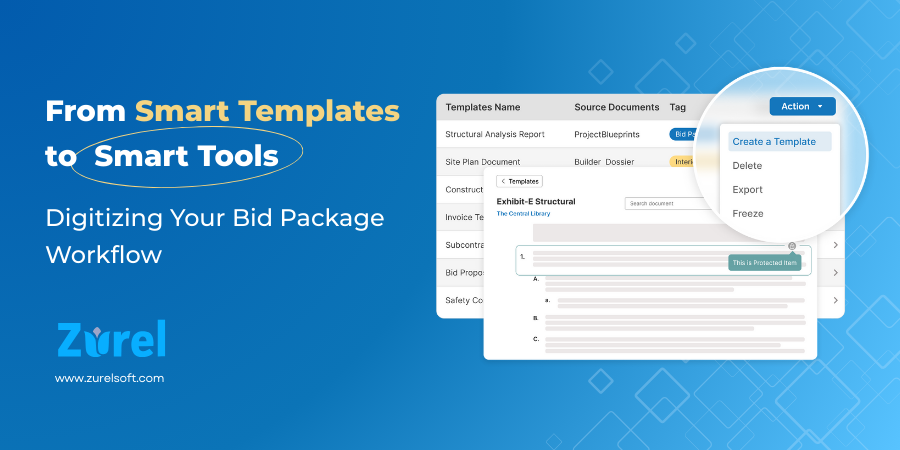
How modern tools like Zurel turn static templates into dynamic, intelligent documents.
Templates Were Supposed to Make Bid Packages Easier
Templates are meant to make life easier. Instead of reinventing the wheel every time you build a bid package, you just open a template, fill in the blanks, and move on.
At least, that’s the theory.
In reality, most teams still rely on static Word documents or Excel sheets that are passed from person to person, project to project. They’re edited, saved under a new file name, and stored in whatever folder structure each person prefers. Over time, those templates become cluttered, outdated, and risky. The “one source of truth template” is good in theory but in the Word environment and in high demand times, the “template” is often pulled from previous projects, co-workers, a server folder with multiple versions of the template, or even from an online source. As a manager trying to keep control over the project, traditional methods of building bid scopes and contract packages typically require a lot of time to oversee and approve other team members’ work.
The irony? The very tool that was supposed to save time and reduce errors ends up creating both.
Modern platforms like Zurel are reimagining what templates should be—dynamic, intelligent, and context-aware. They don’t just give you a starting point; they guide your team, reduce risk, save time and therefore costs, and build organizational memory along the way.
Let’s take a closer look at the biggest limitations of traditional templates—and how smart tools like Zurel address them head-on.
1. You Can’t Protect What Matters
The Problem
Think about your standard bid package exhibit template(s). Some parts, like the project name or dates, need to change every time. But other parts—like contractual language or company policies—should stay exactly the same.
Traditional tools can’t enforce that. Once someone opens the document, it’s all fair game. Or if only certain users can make edits, you get a bottleneck while someone tries to capture and include the changes. Users are expected to know what to edit and what to leave alone. But that relies on human discipline—and humans make mistakes.
Imagine giving someone a tax form where they have to calculate their own tax rate by editing the instructions. That’s essentially what we’re asking when we use static templates.
The Solution
Zurel lets you lock specific line items or sections in your template. These locked items can’t be edited unless the user has permission. Everything else remains fully editable.
This means you can protect critical content—like legal clauses or scope definitions—without limiting flexibility elsewhere. It’s like putting guardrails on a mountain road: you still have control, but now you’re safer from going over the edge.
And Zurel is easy to learn to use, as its layout closely aligns with most industry tools used to create the documents today.
2. Instructions That Disappear When You Need Them Most
The Problem
Many templates include instructions embedded in the text: “Replace this with project name,” or “Delete this section if not applicable.” They’re often highlighted or in a different font, and users are expected to delete them once they’re done.
The issue? These instructions are cluttered, easy to overlook, and disappear forever once removed.
It’s as if IKEA furniture came with step-by-step instructions attached to the furniture itself—and you had to physically remove each instruction label if you wanted the final piece to look clean and presentable. It’s awkward, easy to miss, and once you remove it, the guidance is gone forever.
The Solution
In Zurel, instructions live alongside the content, not inside it. You can add rich, persistent instructions to each template or even to individual line items. They never get in the way of the actual content, and more importantly, they never have to be deleted.
They’re there when you need them—and invisible when you don’t. Think of it as turning on subtitles when watching a movie: helpful for clarity, but never intrusive.
3. Placeholders Are a Manual Nightmare
The Problem
Every template includes placeholders like “[Project Name]” or “[Labor Rate]” that users are expected to replace. But when you’re managing hundreds of documents, find-and-replace becomes a minefield.
Miss one, and you might send a bid with the wrong project name. Replace too aggressively, and you risk changing something you weren’t supposed to. And worst of all, most users don’t even know where all the placeholders are—or whether they’ve updated everything. Or maybe even how to use a Find and Replace function.
You don’t use mail merge and then hand-write every envelope. Mistakes are inevitable.
The Solution
Zurel replaces static placeholders with contextual keywords. Instead of typing “[Project Name]” into every document, you use a smart keyword like {{ProjectName}}.
You define the actual value—say, “Eastlake Office Tower”—once. Zurel updates it everywhere automatically.
Have 30 bid exhibits and 15 attachments referencing the project? All updated. Need to change the rate later? Project name changes? Just update the source value, and Zurel takes care of the rest.
And if a keyword doesn’t have a value assigned yet? Zurel highlights it so you can catch it before finalizing. It’s like having spellcheck for your placeholders.
4. Version Control Is a Guessing Game
The Problem
Templates evolve. Requirements change. Teams learn from experience. But every time a template gets updated, it creates confusion:
- Is this the latest version?
- What has changed since last time?
- Who made those edits?
In traditional workflows, you might store versions with suffixes like “Template_v3_FINAL_Updated_March2023.” And yet, someone still ends up using an older version buried in a shared drive.
It’s like passing out a new company handbook but leaving last year’s version in the break room. Someone’s bound to grab the wrong one.
The Solution
Zurel has built-in revision control for every template. You don’t need to manage files or worry about which one to use. Users only see the latest approved version, and previous versions are preserved for reference.
Want to know what changed or roll back a revision? It’s all there. Multiple files don’t exist, but multiple accurate versions do. The system keeps track of your template’s history, so your team doesn’t have to.
5. You Lose Knowledge Instead of Gaining It
The Problem
Every bid package is an opportunity to improve the next one—but that rarely happens. Edits made in one project don’t make it back into the original template. Helpful comments are buried in emails or disappear once the file is finalized.
The end result? Every project starts from scratch. Lessons learned are forgotten. And new team members have no idea why certain things are done the way they are.
It’s like cooking a great meal, then throwing away the recipe.
The Solution
With Zurel, templates are living documents. When a user suggests an edit or leaves a note, that insight can be saved, reused, and refined over time. Templates live with the latest instructions and changes so its easy to pull the right template every time.
Templates aren’t just tools—they become institutional knowledge. The more you use them, the better they get. Zurel is the first tool to incorporate Lessons Learned in contracting with the tool to write the next scope so you are constantly improving your content.
You’re not just digitizing your documents. You’re building a smarter, stronger preconstruction process—one that learns from experience and scales with your team.
Final Thoughts: Stop Copying, Start Innovating
Templates aren’t the enemy. In fact, they’re essential. But the way we use them today is outdated—and it’s holding teams back.
Zurel transforms static templates into smart, dynamic tools that work with you—not against you. You can:
- Protect critical content with locked line items
- Embed persistent, non-intrusive instructions
- Replace manual placeholders with smart keywords
- Eliminate confusion with built-in revision control
- Capture knowledge and continuously improve your process
This isn’t just about productivity. It’s about reducing risk, improving collaboration, and modernizing the most foundational part of your preconstruction workflow.
And keep in mind: everything we’ve covered here applies to your Smart Templates—your reusable foundation for creating consistent bid package exhibits across multiple projects. These form the foundation of a consistent bid package strategy.
But what about templates that are specific to a single project?
That’s where Project Templates come in—templates created at the start of a project, then shared across all the bid packages for that project. In our next post, we’ll introduce Project Templates and their Inherited Copies, a powerful way to manage consistency at the project level while still allowing flexibility within each bid package.
If you’ve ever had to make the same tedious edit across 35 bid packages, this next one is for you.
About Author