The problem with inline notes in construction scope exhibits
For years, teams have relied on highlighted inline text—“EDIT THIS,” “VERIFY WITH MEP,” “REMOVE BEFORE ISSUE”—to guide creators through scope exhibits. It’s familiar, but it’s fragile. Inline notes are limited (basic text, little structure, no links), they get in the way of reading and editing, and they are meant to be deleted before issue—so once deleted, the instruction is lost. There’s no way for the editor or the reviewer to ensure the instruction was followed—or even that an instruction requiring special attention existed at all. In the pace of preconstruction, those weaknesses compound: teams copy/paste old text, miss a highlight, or remove it “for cleanliness,” and risk creeps in—scope gaps, RFIs, and downstream disputes.
What Usage Direction is—without the clutter
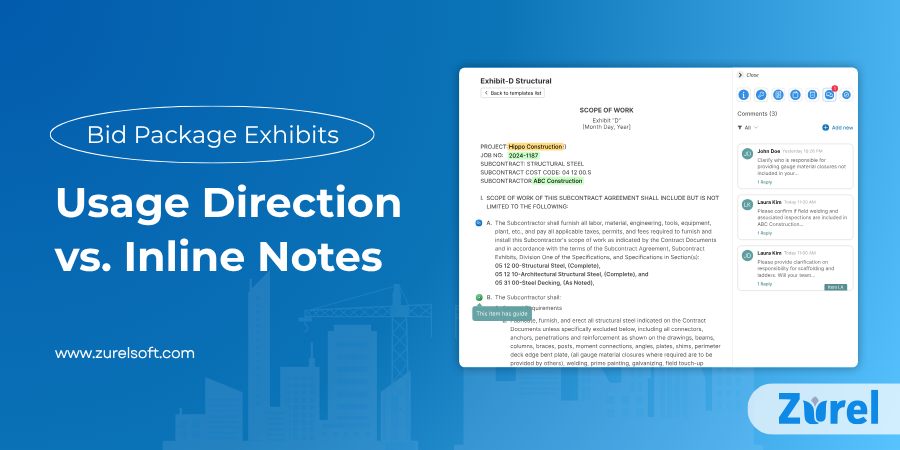
Usage Direction replaces inline notes with embedded, non-inline guidance. Instead of printing directions inside the exhibit text, guidance lives beside the content—attached either to a specific line item or to the entire template. In the authoring environment, authors see a subtle icon indicating that guidance exists; clicking reveals formatted instructions in a side panel. In the published exhibit, because the guidance is never part of the text, it isn’t included in the exported PDF, while the internal audit trail remains available to the team.Think of Usage Direction as context-aware guidance that stays linked to the content it explains but never pollutes the content itself. It helps the author at the moment of editing and helps reviewers confirm whether the right steps were taken.
Why Usage Direction outperforms inline notes
- Clarity without visual noise. Because directions are displayed outside the main text, the exhibit remains readable. Authors can focus on scope language while accessing guidance on demand.
- Richer instructions. Directions can use headings, bullets, checklists, and hyperlinks—for example, a link to the relevant specification section, a jurisdictional table, or a reference detail. Inline highlights rarely support this level of clarity.
- Verifiability. With Usage Direction, creators can mark items as addressed (or complete a short checklist). Reviewers can see what’s done and what’s outstanding. Traditional inline notes vanish on delete; Usage Direction leaves a traceable path and cannot be deleted—only ignored (which is visible to reviewers).
- Scales across teams and projects. Useful directions can be promoted from a one-off to the master template so the same guidance appears wherever that line item is used. Inline notes usually get recreated—or forgotten—project by project.
Safer publishing. Because the direction is never part of the text, it never gets included in exported PDFs or shared copies—no scramble to remove “REMOVE BEFORE ISSUE” text. The exhibit is clean by default.
Where Usage Direction fits in the bid package workflow
Usage Direction isn’t a replacement for specifications or the discipline lead’s judgment. It sits between the template and the final exhibit as a guiding and verification layer:
- At the start, creators see badges on line items that historically cause confusion—alternates, inclusions/exclusions, jurisdiction-sensitive values, or owner options.
- During authoring, they open the guidance, read structured notes, and follow links to sources (e.g., Section 23 05 00 for mechanical general provisions).
- Before review, they tick completion or satisfy a simple checklist—e.g., “Confirmed climate-zone cure time,” “Selected Option B for OSHPD.”
- In review, discipline leads can immediately identify what was addressed versus what still needs attention.
- On publish, because directions are never part of the text, they don’t appear in exported PDFs; the audit of what was completed remains accessible to the team.
An educational example: How Usage Direction Improves Construction Scope Exhibits
Consider a plumbing fixture schedule within a scope exhibit. Historically, templates included inline notes like “HIGHLIGHTED—UPDATE FLOW RATE PER JURISDICTION—DELETE THIS.” It’s easy to miss or delete.
With Usage Direction, the line item for lavatory faucets includes a badge. Opening it reveals:
- A short explanation of jurisdictional flow rate requirements.
- A link to the project’s applicable code reference and the relevant spec paragraph.
- A two-checkbox mini-list: “Verify jurisdictional flow rate” and “Confirm owner preference for finish.”
- A note suggesting standard alternates to list if the owner’s finish selection is pending.
The author completes the two checks; the reviewer sees “2/2 completed” and moves on. The published exhibit is clean—no reminder text to remove, no lingering highlights.
Educational lens: why this matters for risk and quality
This is not “nice to have” formatting. It’s a quality control mechanism embedded at the point of authorship. Inline notes assume perfect behavior: read, interpret correctly, apply, delete responsibly. Usage Direction assumes reality: people miss things, time is short, and details vary project to project. By separating instruction from content—and making completion visible—Usage Direction:
- Reduces ambiguity by placing context where it matters, without diluting the scope language.
- Improves consistency across projects by promoting proven directions into master templates.
- Supports training by making expert knowledge available to newer staff in line-item context.
- Shortens reviews by highlighting what was addressed instead of forcing reviewers to hunt for changes.
Prevents residue because guidance isn’t typed into the document in the first place.
Inline Notes vs. Usage Direction — Comparison Table
| Comparison | Inline Notes | Usage Direction |
| Limited vs. Rich | Plain Highlight | Formatted text, lists and links |
| Obtrusive vs. Clean | Clutters the exhibit | Uses badges with side-panel details (keeps layout clean) |
| Disposable vs. Auditable | Deleted and gone | Tracks completion status and history |
| One-off vs. Scalable | Must be retyped every time | Comes from reusable library entries |
| Manual Cleanup vs. Publish-Safe | Needs manual “remember to delete” | Never part of the text, so exported PDFs stay clean |
Practical considerations for adoption (light touch)
Teams don’t have to retrofit everything at once. Many start by identifying the top ten line items that repeatedly cause rework or review comments, then attach Usage Direction to those. Over time, patterns emerge and the organization promotes these directions to Master Templates, raising the floor for everyone.
Mini case (composite scenario)
A GC’s concrete scope exhibits used to include a recurring inline note about cure times. On two projects, the note disappeared without the value being tailored; both required clarifications. After introducing Usage Direction, the concrete line item carried a short explanation, a link to a climate-zone table, and a must-edit checkbox. Authors checked it as they tailored; reviewers scanned completion status; no clarifications were needed. The published exhibits were clean, and the process was verifiable.
The Bigger Picture for Preconstruction and Bid Package Exhibit Quality
Bid package quality hinges not only on what templates contain but on how teams use them. Usage Direction treats each line item as a small learning moment: a place to capture nuance, direct attention, and document follow-through—without adding noise to the final document. In a domain where small omissions turn into large change orders, that shift—from inline, disposable reminders to embedded, verifiable guidance—has outsized impact.
Frequently Asked Questions
About Author