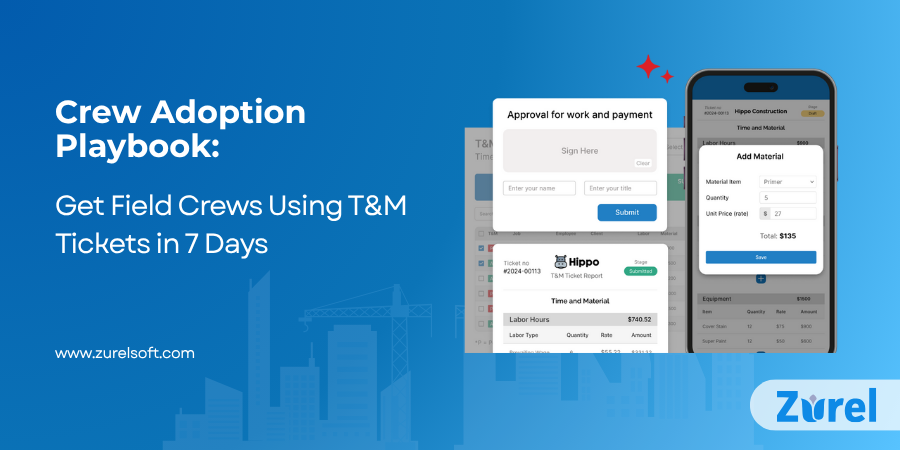
Interest isn’t usage. Field teams say “we like it,” then default to paper because habits, confusing screens, and unclear approvals slow them down. This playbook turns T&M Tickets into a daily habit by focusing on field productivity, not policing. Start small, show value on day one, and close the loop the same day so the crew sees why it’s worth it. Follow the 7-day plan below to launch Digital T&M Tickets on a pilot project and scale T&M Tickets for Construction—without disrupting jobsite rhythm.
The adoption gap: why crews stall out
Paper muscle memory is strong. Clunky apps, too many fields, and muddy sign-off paths make T&M Tickets feel like extra admin. Frame adoption as a field win—fewer callbacks, faster approvals, signed PDFs back to the crew. Pick one pilot crew and one project to build momentum. Tie-ins: The hidden costs of manual T&M Tickets (manual costs), How digital T&M Tickets protect your revenue (protect revenue).
Launch simple, win fast (Week 1 setup)
Start with labor + materials only. Add equipment later. Preload cost codes, default rates, and common materials.
Day-One Template (copy/paste):
- Crew list
- RT/OT/DT
- Brief scope note (What/Where/Why/Client Req)
- Two photos
- Client signature
Set one rule: “Every T&M is created before tools down.” This single standard makes T&M Tickets routine, not optional.
Make Digital T&M Tickets effortless in the field
Field adoption lives or dies on ease. Your Digital T&M Tickets should support one-tap start/stop, offline mode, kiosk for shared tablets, supervisor bulk entry, and auto-calculated OT/DT. Auto-fill project and cost code. Capture photos from the camera, not a gallery scavenger hunt.
Quick wins: Pin the app to home screens, hide nonessential fields from the crew view, and use the plain-language labels the field already uses.
The day-one moment (prove value immediately)
Run a 15-minute tailgate. Create a real ticket on-site. PM approves the same day. The crew receives the signed PDF back before they leave the job.
Reinforce: Celebrate the first approved ticket in the group chat or at standup. Post a mini “before vs after” (paper vs mobile) in the trailer.
Close the loop fast (approvals & visibility)
Same-day PM review with a 24/48/72-hour nudge cadence prevents backlog. Give the client a live link so tickets don’t get lost in their system (see B-126). On approval, auto-send the signed PDF to both teams.
Pro tip: Text the live link to the client rep; avoid heavy attachments that get stuck in email.
Reduce the friction you can’t see (policies & guardrails)
Clear approvers. Pre-agreed rate sheet. Scope note format and minimum photo count. Keep an audit trail—who created, who viewed, who signed, and when.
Lightweight controls that help:
- One-line scope template: “What/Where/Why/Client Req”
- Require a short note on any time edit (accountability without blame)
Make it stick (habits, nudges, recognition)
Daily recap to foremen. Weekly shout-outs for crews with a “zero-miss week.” Micro-incentives like coffee cards cost little and drive consistency.
Five-minute ritual: Every Friday, run an “open vs. approved” standup. Print a simple checklist and tape it inside the gang box.
Measure what matters for T&M Tickets for Construction
Track these KPIs for T&M Tickets:
- Time-to-approval (hours)
- Signature rate in 72h (%)
- $ recovered
- Lost ticket rate (%)
Set targets (for example, 80% signed within 72 hours) and review every two weeks. Share a one-slide dashboard in the Monday meeting to keep adoption visible.
Practical checklist: 7-day rollout plan
Day 1: Choose pilot crew + project; preload cost codes/materials; set the “before tools down” rule.
Day 2: Tailgate demo; create the first real T&M Ticket.
Day 3: Same-day PM approval; text the client a live link.
Day 4: Turn on 24/48/72 nudges; print the crew checklist; define dashboard metrics.
Day 5: Add kiosk/bulk entry; hide extra fields; apply crew feedback.
Day 6: Mini-retro; celebrate wins; remove one friction point.
Day 7: Share results; expand to a second crew.
Mini case: service call, same-day signoff
A two-person service crew documents labor (RT + 1 hr OT), adds two photos and a one-line scope, and gets a client signature on-site. PM approves by 4 p.m. The signed PDF lands with the crew and the client before the end of day. Result: no lost paperwork, invoice the same week, and a cleaner audit trail. Multiply that across dozens of T&M Tickets and the gains compound.
Objections you’ll hear (and fast answers)
- “Another app?” We removed extra fields, it’s faster than paper, and you get a signed PDF back the same day.
- “No signal on site.” Offline mode handles capture; it syncs when you’re back online.
- “Supervisor’s swamped.” Kiosk mode + supervisor bulk entry + defaults keep the crew moving.
- “Client only takes PDFs.” Every T&M Ticket generates a signed PDF automatically.
Conclusion: start small, show value, scale
Crew adoption isn’t a training problem—it’s a value and friction problem. Launch T&M Tickets with a simple template, show a same-day approval, and keep approvals and visibility tight. Once the pilot proves it, expand crew by crew. For deeper detail practices, see
Why T&M Tickets detail matters in construction and T&M Tickets for trade contractors;
for the financial upside, see T&M Ticket ROI.
Frequently Asked Questions
About Author