Manual “find & replace” seems straightforward, but in practice it’s slow, error‑prone, and hard to verify. It can silently change text that should never change—or leave a placeholder term behind that no one notices until documents are issued.
A quick sense of impact: if a team touches 500 variable fields across an issuance cycle and only 2% require rework (missed or unintended edits), that’s 10 issues. At a conservative 30–45 minutes each to diagnose, correct, re‑issue, and communicate, you’ve lost 5–8 hours per cycle—often from your most experienced staff. Centralizing values and resolving them in context removes most of that noise, so people spend their time on real scope decisions instead of housekeeping. Magic Placeholders address this by connecting your documents to the right source of truth and making exceptions visible.
This post is an educational overview: what Magic Placeholders are, how the context hierarchy works, how they behave in protected text, and where they deliver the most value.
This post is an educational overview: what Magic Placeholders are, how the context hierarchy works, how they behave in protected text, and where they deliver the most value.
What are Magic Placeholders in Scope Exhibits
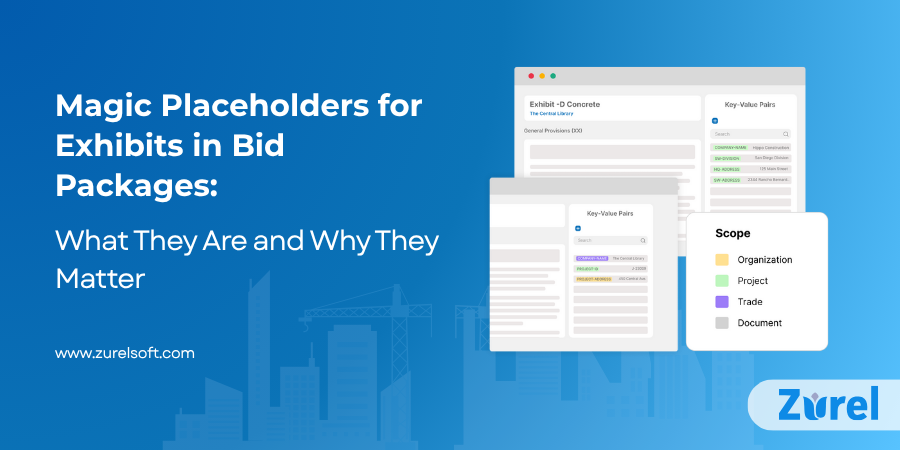
A Magic Placeholder is a field embedded in a Smart Template, a Project Template, or any document in a bid package. Instead of editing static text, you place a field that will resolve to a value from the appropriate context when the document is prepared.
Where values can live (priority high to low):
-
- Document (most specific)
- Document (most specific)
-
- Trade
- Trade
-
- Project
- Project
-
- Organization (most general)
- Organization (most general)
The more specific level wins. A document‑level value overrides a trade value; trade overrides project; project overrides organization. This lets broad defaults travel downward while keeping precise exceptions close to where they apply.
A quick example: if the project’s legal name changes late, updating it once at the Project level refreshes references across relevant exhibits. If one trade requires a different insurance limit, a Trade value can override the project default for that scope without affecting others. If a single document needs a one‑off instruction, a Document value can be used without disturbing templates or other exhibits.
Why Magic Placeholders Matter for Construction Teams
On a typical mid-size project, teams may issue 40–60 exhibits in bid packages, each with 10–20 fields that change (names, addresses, dates, limits). That’s 400–1,200 manual edits per cycle. At only a 1% miss or unintended-change rate, you’re looking at 4–12 errors per issuance—enough to trigger clarifications, scope gaps, or rework.
The risks of ad‑hoc find & replace are cumulative:
-
- Inefficiency: The same edits repeat across exhibits and versions.
- Inefficiency: The same edits repeat across exhibits and versions.
-
- Misses: A project name or address lingers in a paragraph no one scans.
- Misses: A project name or address lingers in a paragraph no one scans.
-
- Unintended edits: Global replace touches text that wasn’t meant to change.
- Unintended edits: Global replace touches text that wasn’t meant to change.
-
- Version drift: Different editors make different edits; exhibits fall out of sync.
- Version drift: Different editors make different edits; exhibits fall out of sync.
-
- Low visibility: It’s hard to see what’s unresolved or where an exception occurred.
- Low visibility: It’s hard to see what’s unresolved or where an exception occurred.
Magic Placeholders reduce these risks by relocating data to the right context and letting documents pull values, rather than relying on people to push edits into every file.
How Magic Placeholder behaves inside protected text
In Zurel, you can protect line items (and entire clauses) from unauthorized edits. This protection is the framework that makes Magic Placeholders practical in real projects: teams keep wording locked while allowing approved data to stay current.
-
- Protect the wording, not the data path. Lock any clause or line item to prevent direct edits. The text can’t be changed by users who don’t have permission.
- Protect the wording, not the data path. Lock any clause or line item to prevent direct edits. The text can’t be changed by users who don’t have permission.
-
- Placeholders still refresh. When context values (organization, project, trade, document) change, placeholders inside protected items update automatically—names, addresses, dates, limits, and other variables stay accurate without lifting restrictions.
- Placeholders still refresh. When context values (organization, project, trade, document) change, placeholders inside protected items update automatically—names, addresses, dates, limits, and other variables stay accurate without lifting restrictions.
-
- Reduce handoffs and rework. Legal and risk wording remains intact; PMs and estimators don’t need special access just to correct a project detail.
- Reduce handoffs and rework. Legal and risk wording remains intact; PMs and estimators don’t need special access just to correct a project detail.
-
- Focus review on exceptions. Because protection blocks ad‑hoc edits while placeholders flow through, reviewers can concentrate on flagged missing values and overrides, not on checking whether someone altered locked language.
- Focus review on exceptions. Because protection blocks ad‑hoc edits while placeholders flow through, reviewers can concentrate on flagged missing values and overrides, not on checking whether someone altered locked language.
This separation—locked wording with dynamic, context‑driven values—delivers consistency and accuracy at the same time.
Magic Placeholders Improve Visibility and Review Efficiency
Exhibits in bid packages touch multiple reviewers—estimating, PM, risk, sometimes legal. What each role needs to see is different, but their time is limited. Zurel makes the review pass efficient by surfacing exactly where attention is required and why. Two simple flags keep everyone aligned and provide a clean audit trail:
-
- Missing value flag: If a placeholder lacks a value in its context, it is surfaced so teams can address it before documents are issued.
- Missing value flag: If a placeholder lacks a value in its context, it is surfaced so teams can address it before documents are issued.
-
- Override flag: When a lower context overrides a higher one (e.g., document over project), the exception is visible for PM/Risk review.
- Override flag: When a lower context overrides a higher one (e.g., document over project), the exception is visible for PM/Risk review.
Instead of proofreading every paragraph, reviewers spend time on real decisions—confirming exceptions and completing missing information.
Magic Placeholders vs. Manual Editing: A Comparative View” Reason: Adds comparison keyword (“vs. Manual Editing”)
Two ways to produce exhibits in bid packages often coexist on teams. Side by side, the differences become clear:
Ad‑hoc editing (search/replace + copy/paste):
-
- Speed to start: fast for a single document, but slows as the set grows.
- Speed to start: fast for a single document, but slows as the set grows.
-
- Accuracy: prone to misses and unintended changes, especially across many exhibits.
- Accuracy: prone to misses and unintended changes, especially across many exhibits.
-
- Consistency: varies by editor; exhibits drift over time.
- Consistency: varies by editor; exhibits drift over time.
-
- Review effort: heavy proofreading; low signal‑to‑noise for PM/Risk.
- Review effort: heavy proofreading; low signal‑to‑noise for PM/Risk.
-
- Auditability: limited—hard to see what changed and why.
- Auditability: limited—hard to see what changed and why.
Magic Placeholder approach (context‑driven fields):
-
- Speed at scale: initial setup in templates; thereafter, one update reaches all relevant exhibits.
- Speed at scale: initial setup in templates; thereafter, one update reaches all relevant exhibits.
-
- Accuracy: values resolve from the correct context; protected text stays protected.
- Accuracy: values resolve from the correct context; protected text stays protected.
-
- Consistency: shared facts stay synchronized; exceptions are explicit.
- Consistency: shared facts stay synchronized; exceptions are explicit.
-
- Review effort: flags focus attention on missing values and overrides.
- Review effort: flags focus attention on missing values and overrides.
-
- Auditability: clear visibility into where values came from and where exceptions live.
- Auditability: clear visibility into where values came from and where exceptions live.
What this means for teams: fewer manual edits, fewer late clarifications, and more predictable reviews—especially when issuing large exhibit sets.
Frequently Asked Questions
About Author