

ScopeMaker
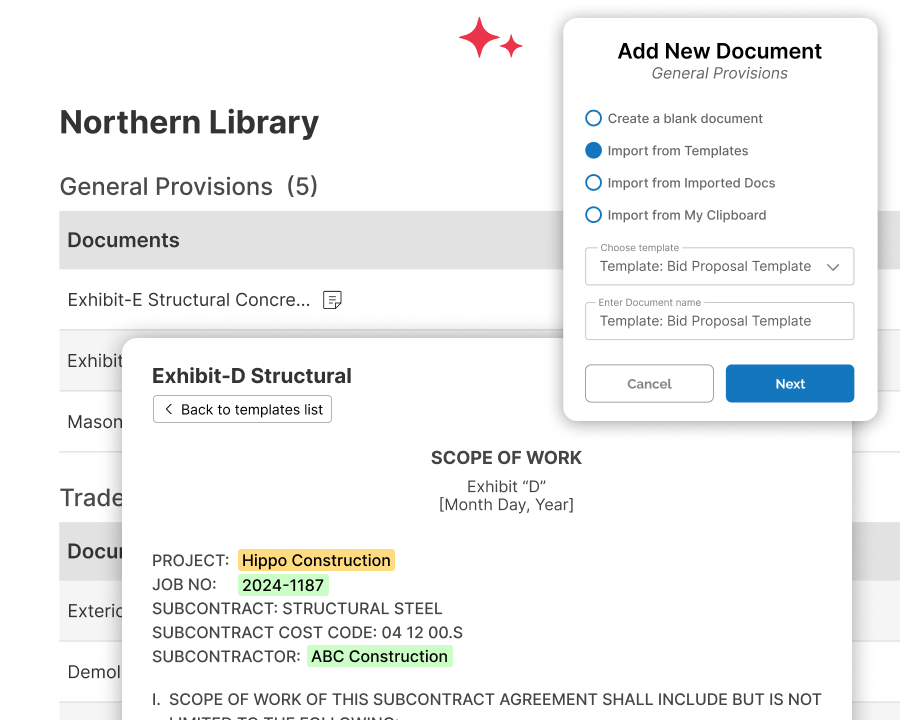
Simplify and streamline your bid package creation process — reduce risk and save time
Build every exhibit and scope directive faster—with less manual work and fewer errors. Zurel brings clarity, consistency, and control to your bid package process, helping you reduce risk while improving quality.
The Traditional Bid Package Process Is Slow and Risky
Creating bid packages is slow, tedious, and error-prone. Teams rely on static templates, copy-paste workflows, and mundane edits—leading to missed spec items, inconsistent exhibits, and increased risk.
Zurel transforms this process by giving you tools to move faster with more control. Instead of working harder to catch mistakes, you work smarter to prevent them—so you can create high-quality bid packages with less effort and less risk.
Build Bid Package Exhibits and Scope Directives Faster—With Less Risk
Standardize Content and Processes
Improve consistency, efficiency, and control with standardized bid package processes.
Start Every Preconstruction Project on Solid Footing
Prepare structure, exhibits, and project data ahead of scope development.
Collaborate Seamlessly with Confidence
Communicate, guide, and share bid package content in one centralized platform.
Standardize Content and Processes
Achieve more consistency, efficiency, and control through standardized bid package workflows
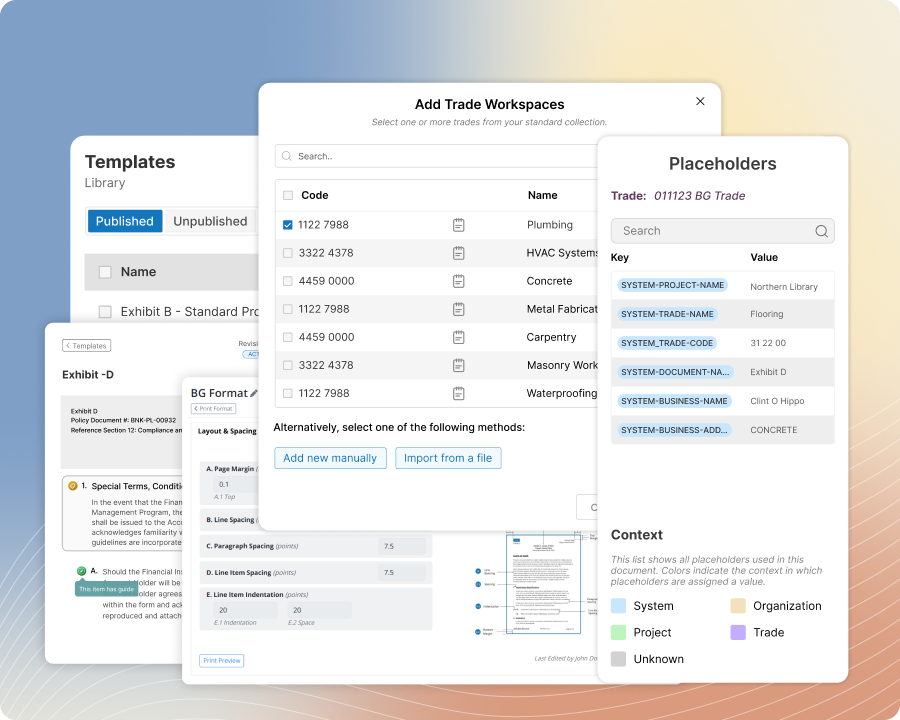
Standardize how your team creates bid package exhibits across the organization. Use exhibit templates, structured trade setup, reusable placeholders, and standard formats to reduce variation, improve clarity, and work more efficiently—without losing the flexibility your team needs for each project or the control you need across the organization.
Key Features:
Smart Templates
Build your preconstruction foundation with exhibit templates that bring more efficiency, consistency, and control.
Divisions/Trades Setup
Standardize your division and trade setup so teams efficiently organize bid packages with more consistency and clarity.
Magic Placeholders
Manage reusable terms and phrases across bid package exhibits with more consistency, efficiency, and control.
Document Formats
Standardize document formats so every bid package exhibit keeps a consistent and professional look.
Start Every Preconstruction Project on Solid Footing
Put the right structure, exhibits, and project information in place before scope work begins
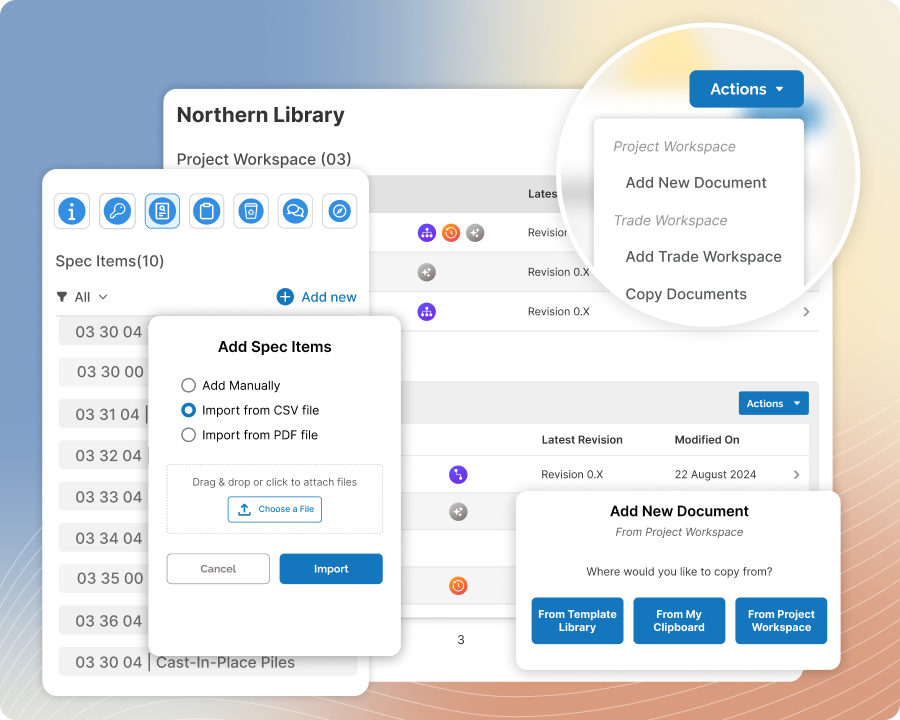
Start each preconstruction project with the right structure, workspaces, exhibits, and project information already in place. Move faster from setup into real scope work and give your team a solid foundation to build from.
Key Features:
Divisions & Spec Items
Import divisions and spec items from the TOC and start with a bid package structure that is precise and accurate.
Workspaces
Organize project and trade exhibits in the right workspaces from the start so your team can build on a solid foundation.
Exhibit Setup
Start each project with the right exhibits in the right workspaces so your team starts with a solid foundation to build upon.
Magic Placeholder
Keep all project exhibits consistent and accurate by updating placeholder values just one time.
Tailor Exhibits with Precision
Tailor preconstruction bid package exhibits with more ease and precision
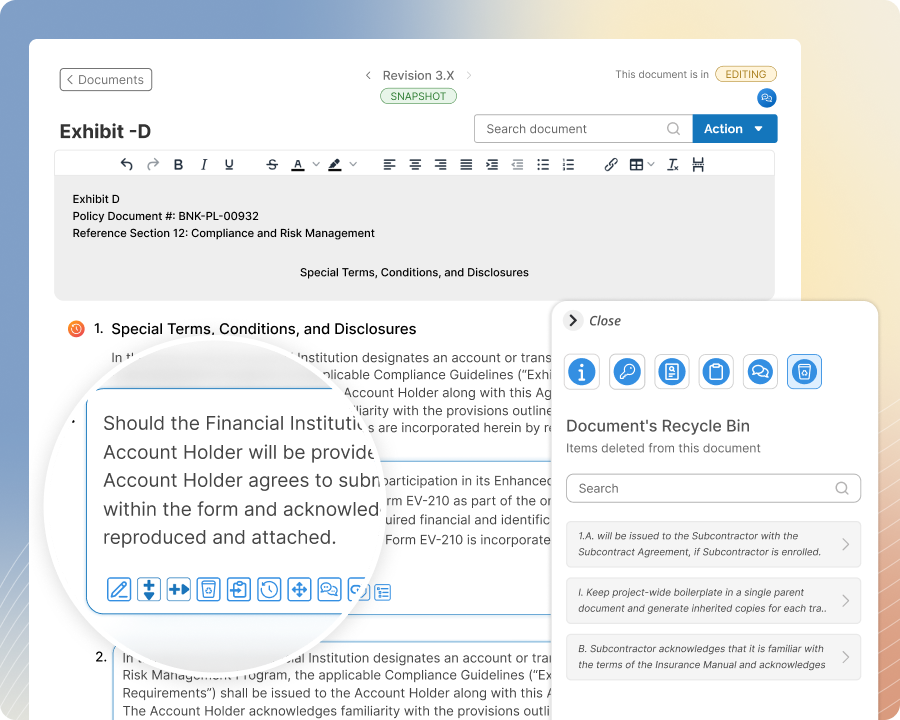
Say goodbye to the old way of editing scope exhibits. Tailor bid package exhibits more efficiently, precisely, and accurately with tools purpose-built for the way preconstruction teams edit scope exhibits.
Key Features:
Enhanced Editor
Tailor exhibits faster with an editor that is both intuitive and innovative.
Line Item History
Edit line items with confidence, knowing you can track, review and revert changes with ease.
Content Insertion
Tailor exhibits more efficiently by inserting content with ease and precision.
User Clipboards
Reuse existing content from across Zurel ScopeMaker to tailor each exhibit more efficiently.
Manage Spec Items Better
Improve spec item coverage, accuracy, and precision across bid packages during preconstruction
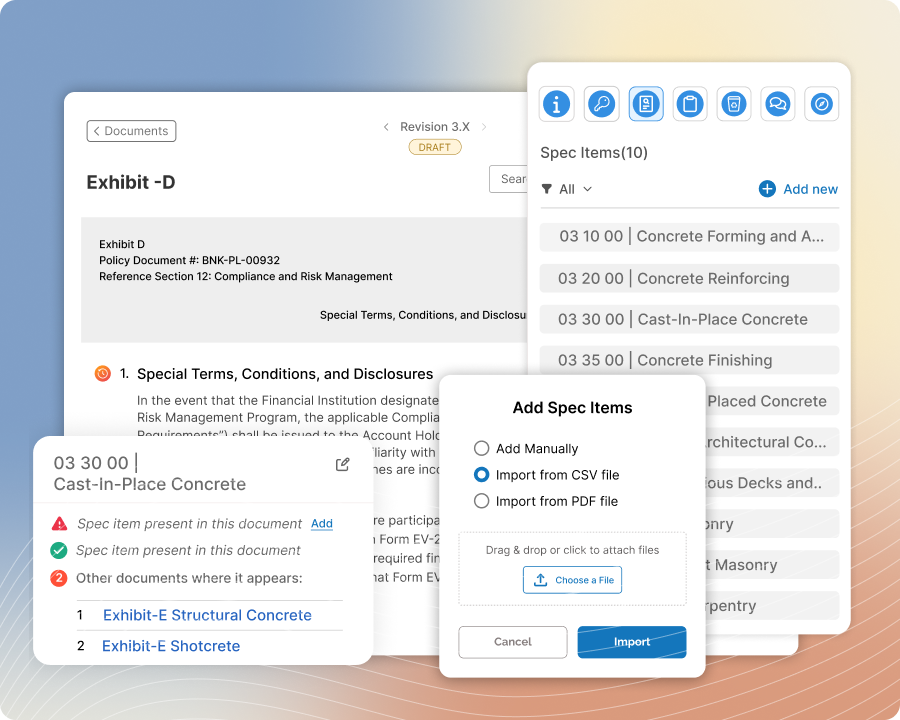
Upload spec items into Zurel ScopeMaker, place them into exhibits with more accuracy, and track buyout, inclusion, and placement across the project. Give your team better visibility into what has been included, what has not, and where each item appears.
Key Features:
Spec Upload
Upload spec items and division codes from a CSV file or PDF table of contents into Zurel.
Project Spec Tracking
See where each spec item is included across the project and spot what has not been included.
Spec Placement
Place spec items into exhibits more accurately using manual or automated placement.
Exhibit Spec Tracking
Review spec item usage in each exhibit and catch overlap or unexpected items.
Collaborate Seamlessly with Confidence
Work with your preconstruction team seamlessly and with confidence—communicate, guide, and share content in one place.
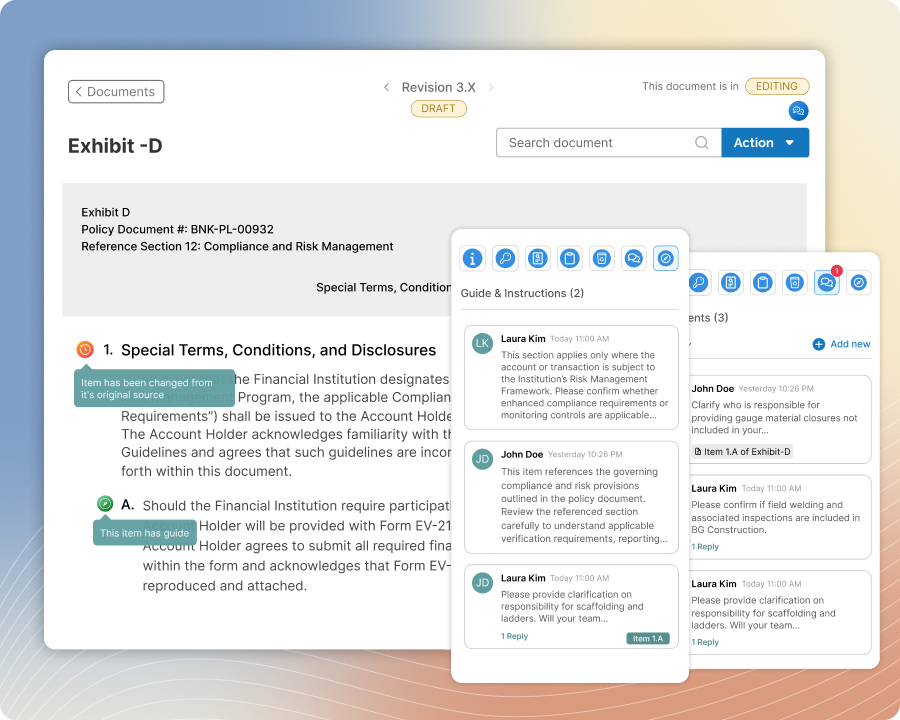
Work better together across every bid package. With context-based chat for real-time discussions, embedded instructions for clarity, change tracking for accountability, and content sharing for efficiency, Zurel helps your team stay aligned and informed—minimizing confusion, rework, and versioning issues.
Key Features:
Guides & Instructions
Add built-in guidance to template line items so every working copy starts with clear direction.
Comments & Conversations
Provide specific guidance or discuss scope in context, right down to the exhibit line item.
Content Sharing
Share line items or documents so they appear on a teammate’s clipboard right away.
User Roles
Assign roles and privileges so users can access the right projects and edit the right content.
Stay Informed While on the Go
Stay informed about your exhibits throughout preconstruction and construction while on the go.
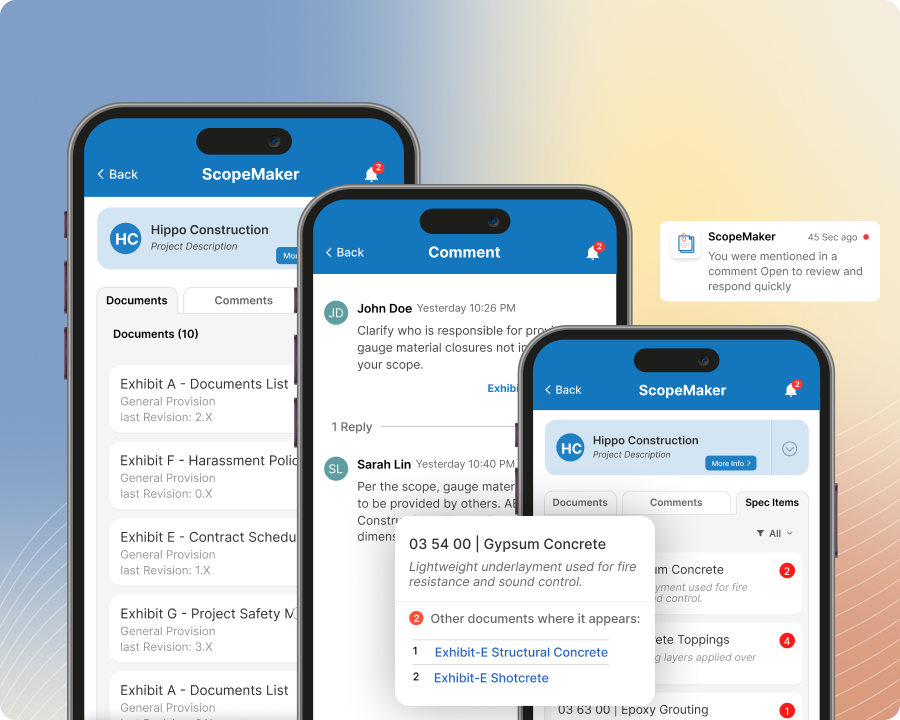
Access bid package exhibits, spec item buyout status, comments, and notifications from the Zurel mobile app so you can stay informed, keep work moving, and carry the same context from preconstruction into construction.
Key Features:
Document Access
Keep bid package exhibits at your fingertips and access them anywhere on your mobile device.
Spec Item Tracking
Monitor spec item buyout status and track buyout progress while on the go.
Comment & Conversation
Communicate with your team in the context of the exhibit from the convenience of your mobile device.
Mobile Notifications
Get notified about comments, mentions, and exhibit activity as they happen.
Access Preconstruction History
Revisit preconstruction history even long after construction is complete
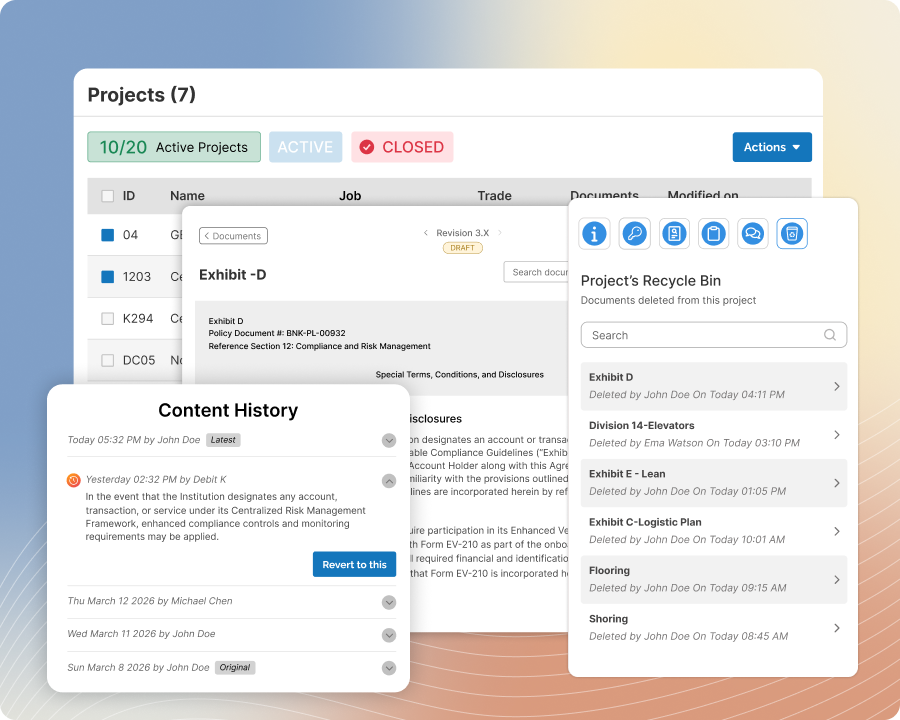
Preserve the history and context behind your exhibits so your team can understand past work long after it was created. ScopeMaker helps you revisit past decisions, changes, discussions, and deleted content whenever needed.
Key Features:
Line Item History
Review the history of each line item and understand what changed over time.
Comments & Conversations
Revisit the conversations behind document and line item decisions when you need context.
Recycle Bins
Restore deleted documents and content or review them later to understand past decisions and context.
Project Archives
Unarchive closed projects in full so your team can revisit past work, history, and context long after completion.
Leverage Past Exhibit Language
Reuse proven language from past exhibits across new preconstruction work
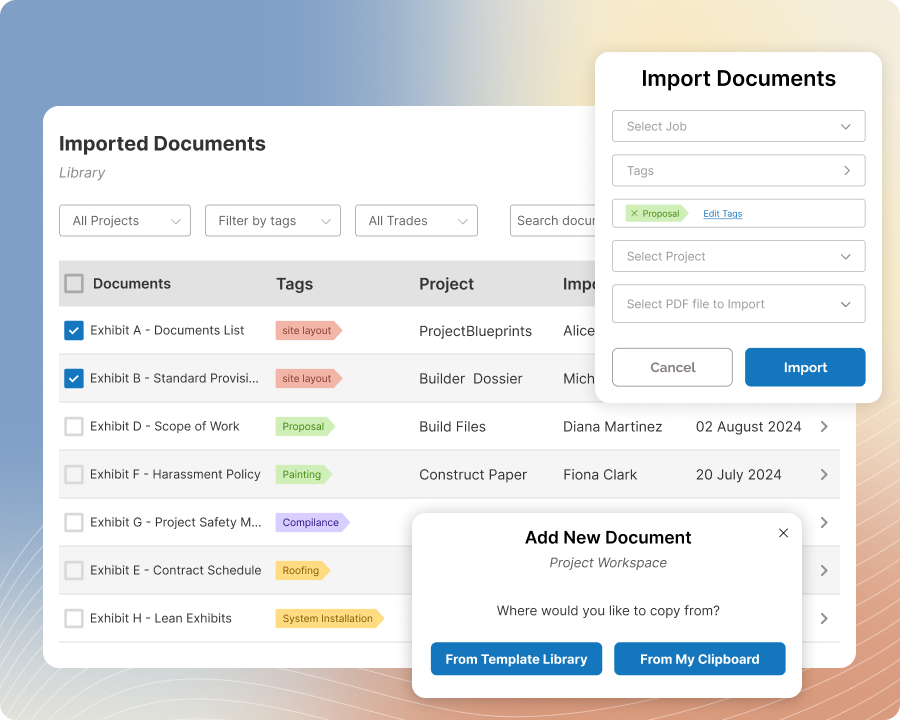
Easily reuse content from past exhibits to build new bid package exhibits more efficiently. Find the language your team used before for similar scope, review it in context, and reuse it in current work instead of rewriting scope from scratch.
Key Features:
Create and Completed Exhibits Library
Find, review, and reuse completed exhibits from past projects.
Line Item Library
Find specific line items from past work and reuse them in your current exhibits.
Imported Exhibits Library
Import exhibits created outside ScopeMaker and reuse their content in current projects.
Why Teams Choose Zurel for Bid Packages
Because Zurel’s innovative solution simplifies the creation of bid packages—while helping teams reduce risk, save time, and improve consistency.
Zurel helps their team create high-quality bid packages faster, with fewer errors and tighter control—while building a growing knowledge base that makes every future project easier to start and easier to get right.
Faster Exhibit Creation
Cut hours of manual editing by starting from Smart Templates and reusing content from your Knowledge Base.
Fewer Errors and Missed Items
Reduce mistakes with line-item locks, contexted placeholders, and spec item tracking built into every step.
More Control, Less Chaos
Control what gets edited, who sees what, and when documents are shared—with full visibility from start to finish.
Continuous Improvement
Every finalized exhibit gets archived, tagged, and indexed—making each project stronger than the last.
Frequently Asked Questions